
American Airlines
American Airlines, Inc.Travel & Local
4.824.24K Reviews
- Version
- 2026.34
- Installs
- 10.00M
- Age Rating
- Everyone
Screenshots

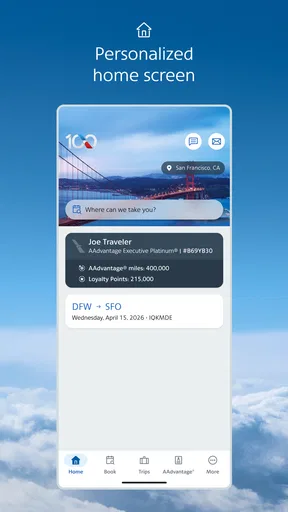
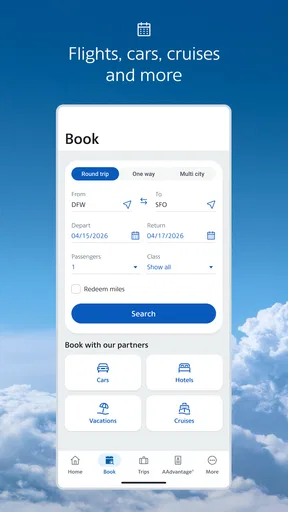
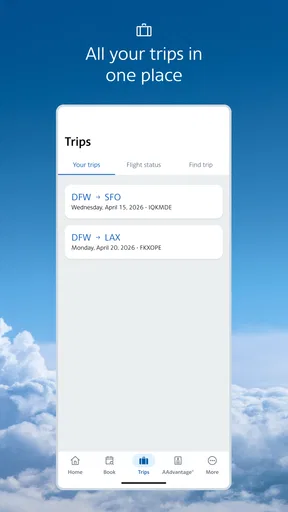
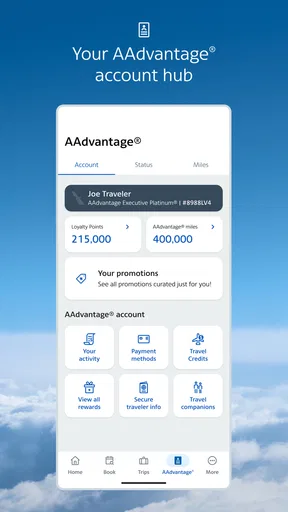
Our Review of American Airlines
 Analysis by Appyee
American Airlines has taken flight in the app world with its sleek and efficient app, perfect for anyone who loves to travel or needs to jet off for business. Let me tell you, this app is like having a personal assistant right on your phone, ready to sort out your travel plans with a few taps. If you’re like me and can’t stand the hassle of airport chaos, this app is a godsend.
That convenience matters most when a trip already has enough moving parts: a meeting across the country, a family visit, or a connection that leaves little room for confusion. I see this as a useful companion for people who regularly fly with American and want the airline’s own tools close at hand, rather than a general travel app that treats every carrier the same. It is a free travel app from American Airlines, Inc., and its broad reach—more than 10 million installs—makes it familiar to many travelers. I would still think of it as a practical organizer, not a substitute for checking airport displays or asking staff when a decision needs a human answer.
Fly with Ease
First things first, the American Airlines app is all about making your flying experience as smooth as possible. From booking your flight to checking in, it’s all there in one place. You can even track your luggage, which is a huge relief for those of us who have had our bags take a different vacation than we did!
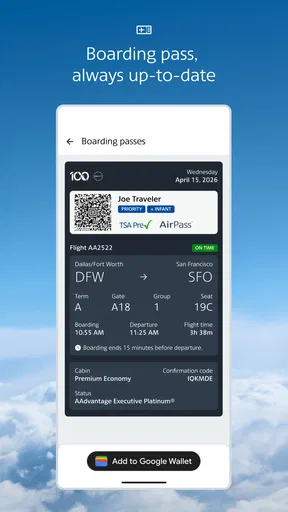
My preferred workflow begins before leaving home: open the trip details, review the itinerary, and check in when the option is available. Then I keep the boarding pass accessible on my phone instead of searching through email at the airport. That small bit of preparation is especially helpful when travelling with a family member who needs the flight details quickly, or when I have several travel documents to keep straight. I would make sure the phone is charged and that the pass is ready before joining a security line; a digital pass is convenient, but convenience depends on being able to show it when needed.
For a realistic workday trip, imagine leaving for the airport after a morning meeting, with a connection later in the day. I would check the itinerary before setting out, use the app to follow flight and gate updates, and revisit the trip details during the layover rather than relying on a screenshot taken hours earlier. If a change appears, the airline app gives me a direct place to inspect my flight, while airport screens remain a useful second check. The handoff between phone and airport is the key: the app helps me stay organized, but staff and terminal information still matter when plans shift quickly.
One feature I absolutely love is the mobile boarding pass. No more fumbling with paper tickets while juggling your bags and coffee. Just scan your phone at security and you’re through. It’s like magic!
I do treat that pass as a convenience rather than a guarantee that every part of the airport journey will be effortless. I keep the screen brightness high enough for scanning and avoid letting the phone battery get low before boarding. If I am travelling with someone else, I also make sure each person can access their own pass rather than assuming one phone will be enough for the whole group. These are simple habits, but they reduce the chance of turning a quick checkpoint into a scramble.
Features That Make Life Easier
The app has a bunch of handy features that are worth mentioning. You can easily check your flight status, gate information, and even get updates on any delays. It’s like having a pocket-sized travel agent.
- Real-time flight updates
- Gate change notifications
- Seat selection and upgrades
These features ensure you’re always in the loop, which is crucial when you’re racing to catch a connecting flight or trying to make the most of a layover.
The most useful way to read these updates is as prompts to take the next step, not as a reason to stop paying attention. A gate notification can help me decide when to leave a café, while a status check can tell me to look again before arranging a ride to the airport. For a connection, I would check both the arriving flight and the onward flight as the travel day unfolds; watching only the first leg can leave me unprepared for a change to the second. This is a small but important workflow distinction: the app can put trip information in one place, but I still need to interpret it in the context of where I am and how much time I have.
Seat selection and upgrade options are useful when I want to review my own arrangements, but I would not assume that every preferred seat or upgrade will be available. I treat them as choices to inspect during trip planning, rather than promises. That makes the app more helpful for managing expectations: it gives me a place to check what is offered for my itinerary, while the final decision depends on the options shown for that trip.
Keeping You Connected
Another awesome part of the app is its ability to keep you connected. The in-app chat support is a lifesaver when you need help on the fly, literally. You can also access your AAdvantage account, track miles, and even book hotels and rental cars. It’s all interconnected, making your trip planning seamless.
Having account and trip tools together is most valuable when a journey involves more than boarding a plane. I can review the flight plan and keep an eye on miles without jumping between unrelated airline services, then consider lodging or a rental car as part of the same broader trip. Still, I would compare hotel and car options before committing if price, location, or special requirements matter; the convenience of starting inside an airline app does not automatically make it the best place for every purchase. For a straightforward itinerary, keeping the basics together is efficient. For a complicated holiday with several stops, a dedicated planning tool or direct contact with a provider may be easier to manage.
Chat support is another handoff point. It can be a sensible first stop for a question that can be explained clearly in writing, especially when I do not want to search through help pages. When time is tight or the problem involves a complicated rebooking, I would not rely on a chat alone without checking the airport’s staffed support options too. The app is strongest when it helps me find the right next action; it cannot remove the uncertainty that comes with last-minute travel changes.
Plus, if you’re like me and love to have everything planned out, the app’s integration with Apple Wallet and Google Pay makes transactions swift and easy.
For a smoother day, I would set up the wallet option before heading out instead of trying to do it while boarding is approaching. That gives me another way to bring up travel items when I need them and reduces the number of screens I have to search through. I still keep the airline app available, since the trip itself is where I would return for current flight details. In practice, the wallet and the airline app serve different parts of the same workflow: one can make access convenient, while the other is the place I use to manage the trip.
Who Will Get the Most from It
I would recommend this app first to travelers who already fly American Airlines and want a direct route to their itinerary, check-in, boarding pass, and flight updates. It is also a sensible choice for people who travel often enough to value having their account and miles close to their flight information. Occasional travelers can benefit too, particularly if they prefer to keep the airline’s own trip tools on their phone instead of relying on confirmation emails alone.
It is less compelling if you rarely fly with American or mainly want to compare fares across several airlines. A general travel search app may be better for comparing carriers and building a trip that mixes airlines, while this app is centered on managing travel with American. I would use both if I were still deciding which airline to book, then rely on the airline app once the trip was set. That division keeps the strengths clear instead of expecting one app to handle every stage equally well.
The app is rated for Everyone and has an average rating of 4.5 from around 110,000 ratings, with about 19,000 written reviews. Those figures suggest that it is widely used, but I would judge it by whether its airline-specific workflow fits my own travel habits. It is free, and it runs on operating systems from version 8.0 onward; its current version is 2025.32. It first appeared on February 7, 2011, so it is an established product rather than a newly launched travel experiment.
Where the Flow Can Break
No phone app can make every airport handoff seamless. A gate can change after I last checked, a connection can become stressful, or a device can be hard to use at exactly the wrong moment. Notifications are helpful only if they are enabled and noticed, so I would not make them my only source of flight information. I check the app deliberately at sensible points—before leaving, on arrival at the airport, and during a connection—and use terminal displays or staff when the situation calls for confirmation.
There is also a practical trade-off in keeping the whole trip on a phone: the more I rely on it, the more I need to think about battery, connectivity, and access to the account. I would prepare before travel and keep the key itinerary details easy to find. If I am travelling with someone who is less comfortable using apps, I would agree on a simple backup plan rather than assuming they will be able to navigate the same screens under pressure. These precautions do not make the app less useful; they make its role more realistic.
American Airlines is a focused tool, not a universal travel dashboard. Its airline-specific organization is an advantage when the trip is with American, but it is not the option I would choose to coordinate unrelated bookings or compare every flight available. Likewise, a person who prefers paper documents can still plan around the app without making it the center of their journey. The right choice depends on what needs solving: flight management is where this app makes the clearest case for itself.
Final Thoughts
In a nutshell, the American Airlines app is a must-have for any frequent flyer. It combines convenience, efficiency, and a touch of luxury into one handy package. The ability to manage every aspect of your travel from your phone is not just a luxury, but a necessity in today’s fast-paced world.
Whether you’re a business traveler or planning your next vacation, this app is designed to make your life easier and your travels smoother. So, next time you’re heading to the airport, make sure this app is downloaded and ready to go. Trust me, your travel experience will never be the same!
My recommendation is a little more specific: I would install it if American is already part of my travel plans, prepare the trip details before departure, and use it alongside—not instead of—airport information and common-sense backups. That approach lets the app do what it does best: keep the airline’s journey details within reach and reduce avoidable searching on travel day. If I mainly need broad fare comparisons or one place for trips across several carriers, I would choose a general travel tool for that job and keep this one for American flights.
Privacy and Permissions
See what permissions an app requests and how it handles your data.
- Location
- approximate location (network-based), precise location (GPS and network-based)
- Photos/Media/Files
- read the contents of your USB storage, modify or delete the contents of your USB storage
- Storage
- read the contents of your USB storage, modify or delete the contents of your USB storage
- Camera
- take pictures and videos
- Wi-Fi connection information
- view Wi-Fi connections
- Other
- view network connections, pair with Bluetooth devices, access Bluetooth settings, full network access, control Near Field Communication, run at startup, reorder running apps, control vibration, prevent device from sleeping
Verdict
Strengths of American Airlines
- User-friendly interface for easy navigation.
- Real-time flight updates enhance planning.
- Mobile boarding passes streamline check-in.
- Integrated AAdvantage account management.
- In-app customer service chat is responsive.
Limitations of American Airlines
- Occasional app crashes disrupt usage.
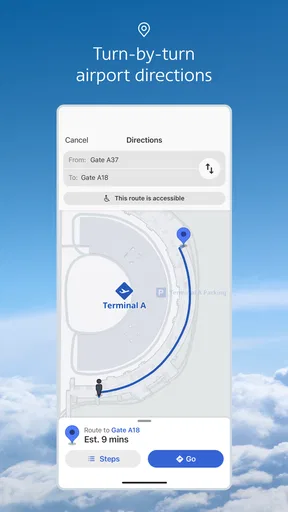
- Limited airport maps and terminal guides.
- Seat selection sometimes glitches.
- Frequent login prompts can be annoying.
- Some features require strong internet.
Similar Picks in This Category
View All
Google Maps
Google LLC3.4

Google Maps Go
Google LLC4.1

Booking.com: Hotels & Travel
Booking.com Hotels & Vacation Rentals4.8

Google Earth
Google LLC3.8

Skyscanner Flights Hotels Cars
Skyscanner Ltd4.8

trivago: Compare hotel prices
trivago N.V.4.4
Frequently Asked Questions
What features does the American Airlines app offer?
The American Airlines app provides various features to enhance your travel experience. You can check in for flights, access your mobile boarding pass, view your flight information, track your bags, and receive real-time updates. Additionally, the app offers the ability to book flights, select seats, and manage your AAdvantage account.
How can I manage my bookings using the app?
Managing your bookings is straightforward with the American Airlines app. You can view your upcoming trips, change or cancel flights, and update your seat preferences. The app also allows you to add special requests, such as meal preferences, and even upgrade your seat using AAdvantage miles or cash.
Is the American Airlines app available for both Android and iOS?
Yes, the American Airlines app is available for download on both Android and iOS platforms. You can find it on the Google Play Store for Android devices and the Apple App Store for iOS devices. It is designed to work seamlessly across various devices to provide a consistent user experience.
Does the app support real-time flight updates and notifications?
Absolutely, the American Airlines app supports real-time flight updates and notifications. You can receive alerts about gate changes, flight delays, and boarding times directly on your device. This feature ensures you stay informed throughout your travel journey, allowing for a more relaxed and organized experience.
Can I use the app to access my AAdvantage account details?
Yes, the American Airlines app allows you to access and manage your AAdvantage account with ease. You can view your mileage balance, check your elite status, and track your progress toward upgrades and rewards. The app also lets you update your profile information and manage your account settings directly from your mobile device.
